Make security work traceable.
Keep risks, incidents, and evidence connected to their owners. Review the recorded work and add supported telemetry when your sources are verified.
Evidence with review context.
Link supporting files to controls, record collection and validity dates, and keep ownership visible. Control-assurance checks explain gaps from your workspace records.
What your team can do
- Organize evidence alongside its related controls.
- Review ownership, due dates, and evidence freshness.
- Inspect stored assurance runs before sharing results.
Stale, expired, undated, or scan-ineligible evidence cannot satisfy a control. Readiness signals are not certification.
Illustrative workspace
Evidence review
- Access review
- Policy acknowledgement
- Incident follow-up
Selected record · Access review
Keep the review context with the evidence.
Record the supporting material, identify the accountable reviewer, and retain the review decision.
- Evidence
- Quarterly access review
- Reviewer
- Assigned security owner
- Review state
- Awaiting human review
- Next step
- Check the evidence before recording a decision.
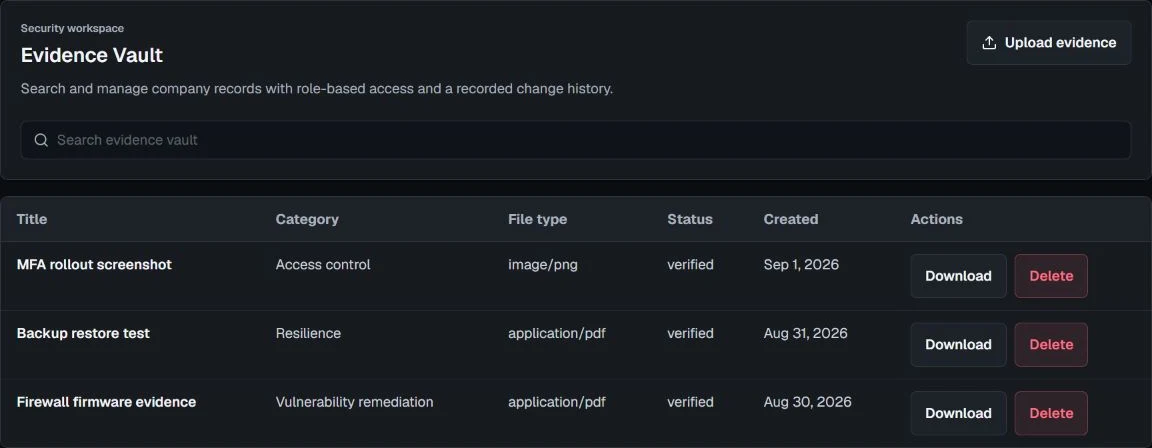
Inspect the demonstration evidence register
Risks and incidents with an owner.
Move beyond a list of findings. Keep severity, mitigation notes, priorities, and response progress available to the people responsible.
Follow the work through
- Maintain assets and a structured risk register.
- Track vulnerability records and remediation work.
- Review incident status and follow-up actions.
Records support coordination; they do not replace your incident-response process or managed security team.
Connections you can account for.
Manual workflows are available without a connected source. Add supported Wazuh synchronization or signed collectors after the required authorization and verification.
Availability stays explicit
- Review source configuration and connection health.
- Use scoped API access when included in your plan.
- Configure signed outbound webhooks with the required controls.
SSO and SCIM remain roadmap items. A listed integration is not evidence of a live connection.
Reports for a considered review.
Bring recorded operations into executive reporting and authorized exports. Keep review and access controls in the reporting workflow.
Human judgment remains essential
Where enabled, the defensive assistant helps explain and summarize security work. Qualified owners should review generated output and evidence before acting or sharing externally.
Read about access and review boundariesFeature questions
Which features require verification?
Wazuh synchronization, signed collectors, outbound webhooks, billing, email delivery, and assistant providers are enabled only when they are available for the account and their required controls have been verified.
How does SecureOps check evidence freshness?
SecureOps compares a verified, clean evidence item’s recorded collection and validity dates with the tenant’s configured freshness window. The result is a stored-record readiness signal, not an audit opinion or certification.